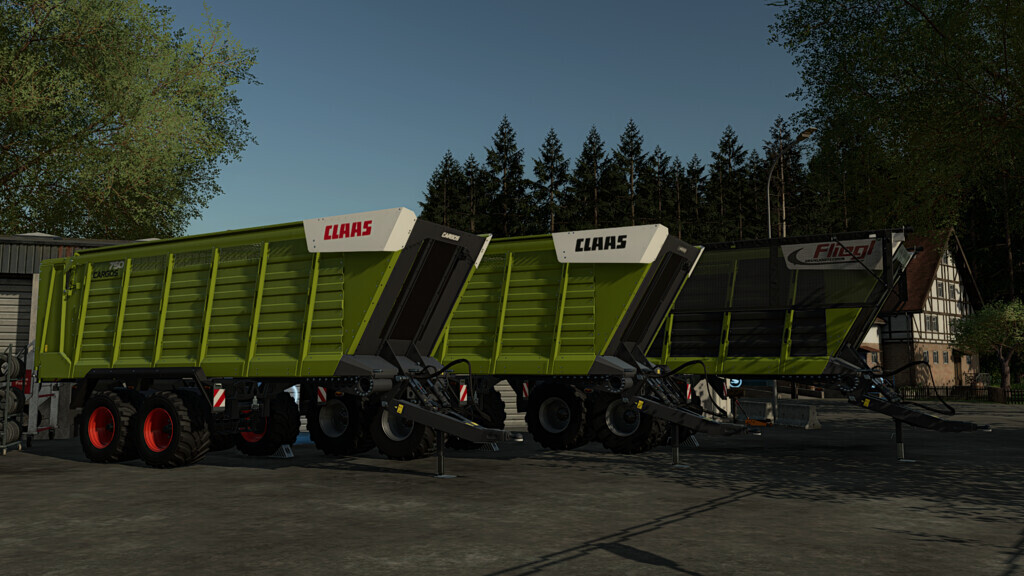
Fliegl/Claas 750/760 Trailers v 1.1
About the mod:
CARGOS 750
Price: 67.500 $
Capacity: 44.500 l
CARGOS 760
Price: 97.500 $
Capacity: 51.000 l
– Tires: Trelleborg Vredestein Michelin BKT Lizard
– Brand Configuration: Claas | Fliegl
– Manufacturer related color range
– Metering rollers Configurable
Version 1.1:
* Added warning signs to the tailgate
* The store icon and brand displayed in the fleet now adapt to the configured manufacturer
* Color selection palette expanded
* Claas stickers in black added and made configurable
* Added Cover
Credits:
[MFZ]Daimondog
How to install FS19 mods?
Firstly find a mod which you like and want to download. Then download a mod to your PC. Mods are usually in .zip format file. But sometimes it can be in .rar. If a mod file is a .zip format no needed additional actions. If a file is in .rar, then you must unarchive mod with software like WinRar or Zip7. Windows 10 users no need to use software for archives, Win10 itself has a feature to unarchive files.
The next step is to find mods folder in your PC. Usually, it is in Documents/My Games/Farming Simulator 19/2019. Open the "mods" folder and put downloaded .zip archive or unarchived .rar file to this folder.
Last step. Enjoy of FS19 mods!