Crop Planner Program v 1.0
About the mod:
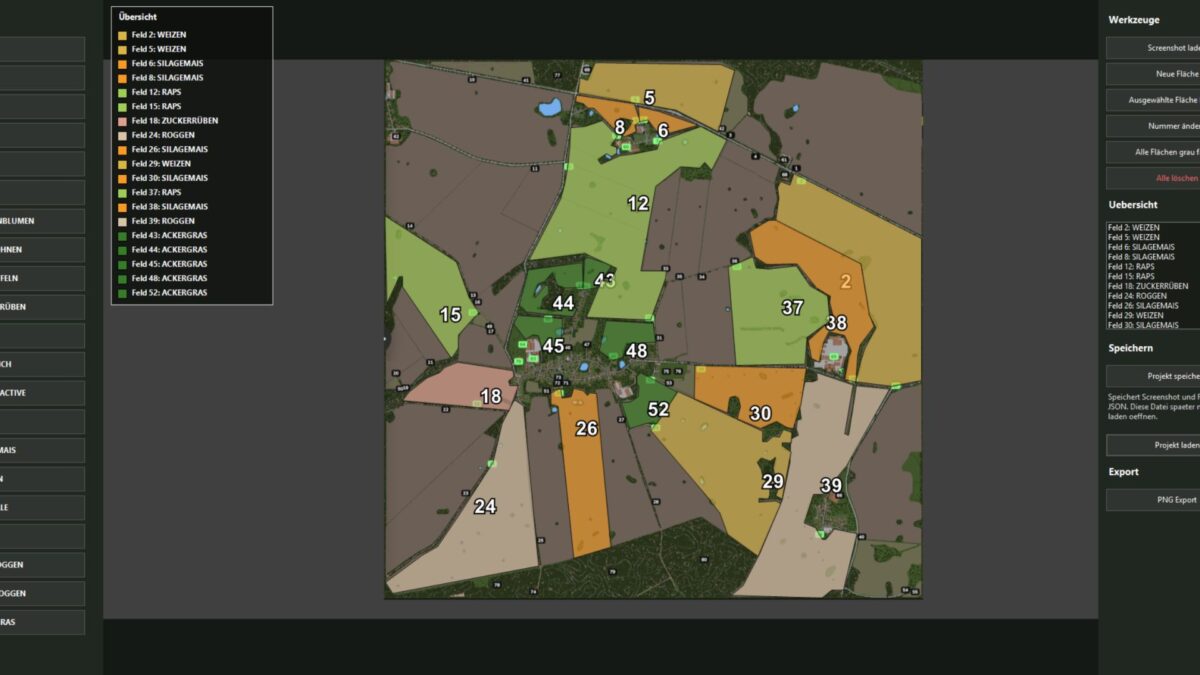
The KTD Agrar crop planner is a simple Windows tool for visually planning crop areas.
Based on a loaded screenshot or map image, field areas can be drawn, numbered and colored with crops.
The tool offers a clear list of areas, automatically sorts the fields by number and shows the current occupancy directly in the plan.
Projects can be saved and reloaded later.
The finished cultivation plan can be exported as a PNG, including an area overview in the image.
Credits:
KTDAGRAR
How to install FS19 mods?
Firstly find a mod which you like and want to download. Then download a mod to your PC. Mods are usually in .zip format file. But sometimes it can be in .rar. If a mod file is a .zip format no needed additional actions. If a file is in .rar, then you must unarchive mod with software like WinRar or Zip7. Windows 10 users no need to use software for archives, Win10 itself has a feature to unarchive files.
The next step is to find mods folder in your PC. Usually, it is in Documents/My Games/Farming Simulator 19/2019. Open the "mods" folder and put downloaded .zip archive or unarchived .rar file to this folder.
Last step. Enjoy of FS19 mods!