

Farmland Splitter v0.0.6.0 BETA 2

Farmland Splitter v0.0.6.0 BETA 2
Ever wanted to reshape the map’s farmlands or split big fields directly from inside the game?
Farmland Splitter brings map-editing capabilities straight into your gameplay session!
With this tool, you can redefine, cancel, or create new farmlands from scratch (within the available ID limits).
You could literally take a blank map and build your own custom map layout directly ingame leveraging FS25’s extensive placeables library and terrain editing tools, now combined with fully customizable farmlands.
Key Features:
Single Player, Pc Only
In-Game Customization: Create, modify, or delete farmlands and field boundaries dynamically.
Safe & Non-Destructive: All changes are stored safely inside your savegame folder. The original map files remain completely untouched
Intuitive Interface: Features a clean, self explanatory menu.
Blank Canvas Friendly: Perfect for custom map projects or heavily tailored career saves.
How to Use:
Open Menu: Press Right Shift + Right Ctrl + F12.
Navigate & Edit: Use the simple on-screen controls to adjust farmlands.
Apply Changes: mportant: Any modification will only take effect after pressing the F key.
Exit Menu: Press Esc.
What’s Coming Next? (In Development)
This mod is part of a larger toolkit I’m working on to make full in-game map creation a reality. Currently in progress:
In-game Pedestrian & Traffic Spline Creator
Savegame-to-Map Compiler: A lightweight standalone tool that automatically integrates your saved game edits directly into a publishable map file.
Together with existing placeable systems and terrain tools, full map creation without leaving the game is almost here!
Version 0.0.6.0 BETA 2
What’s Changed
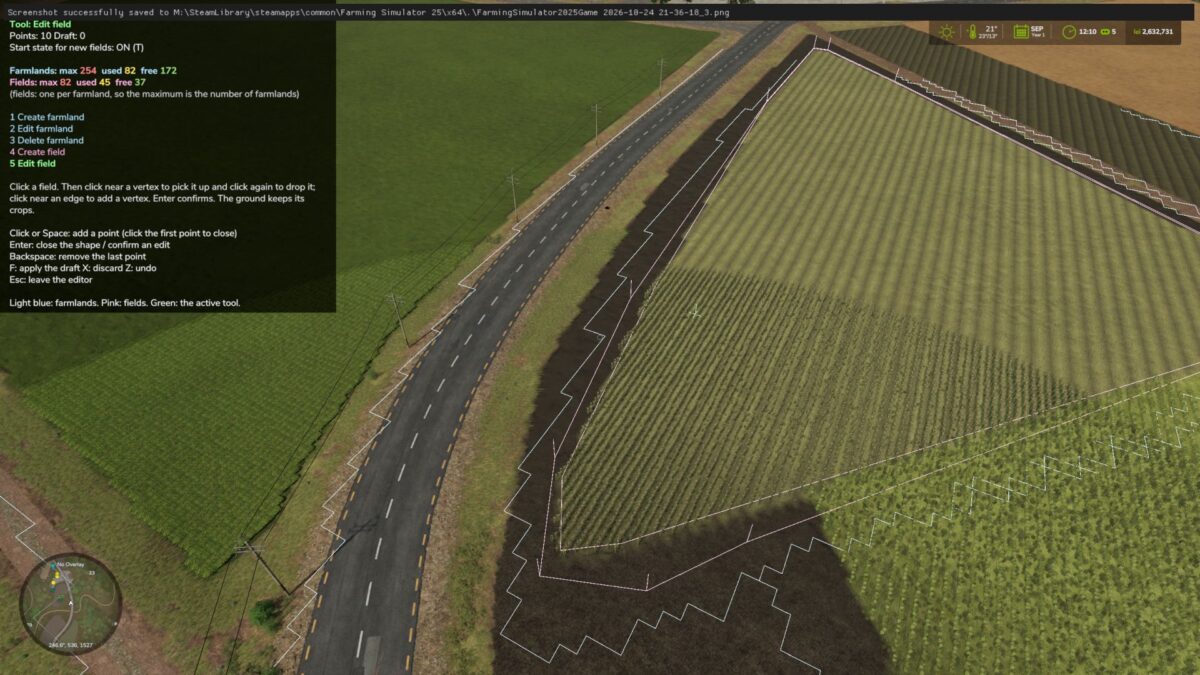
Tools & Keybindings (Keys 1-5)
1. Create farmland
2. Edit farmland
3. Delete farmland
4. Create field
5. Edit field
Cutting and extending have been removed, and the dedicated “delete field” option is gone. A field is now only deleted alongside its parent farmland.
Colors
Farmland: Everything related to farmlands (boundaries, drawn shapes, deletion markers) is light blue.
Fields: Everything related to fields is pink.
Active Tool & Cursor: Displayed in green.
Counter UI
Farmlands: Formatted as Farmlands: max [MAX] used [USED] free [FREE] (e.g., max 254 in red, used 244 in yellow, and free 10 in green).
Fields: Follows the exact same format. The maximum limit matches the number of farmlands, as you can have at most one field per farmland.