
TT FertiMAX v1.0.0.0

FS25 mods

TT FertiMAX v1.0.0.0


TT FertiMAX v1.0.0.0

TT FertiMAX v1.0.0.0

TT FertiMAX v1.0.0.0

TT FertiMAX v1.0.0.0
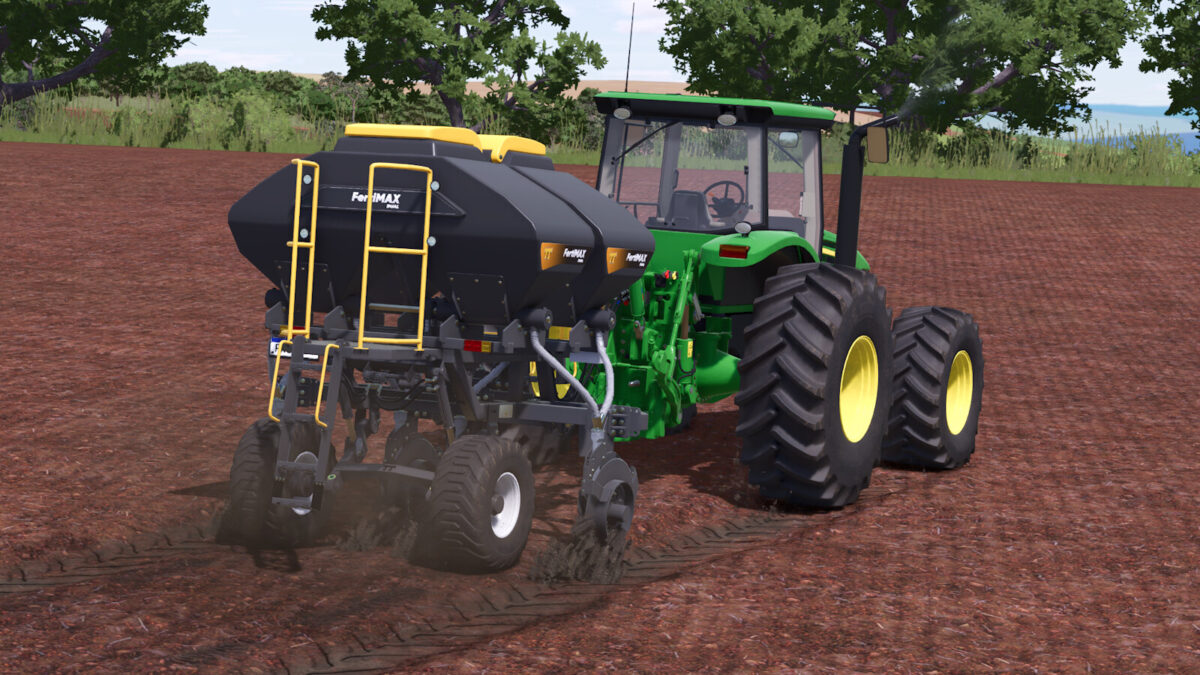
TT FertiMAX v1.0.0.0

About the mod:

With TT FertiMAX Fertilizer injector, you can perform soil fertilization after harvesting sugarcane, preparing it for the next crop season. It can also be used in other crops, and when used for fertilization, it won’t harm the crop as it provides only surface fertilization. Increase your productivity and crop yield.
– Category: Fertilizer Spreaders
– Price: $20.000
– Recommended Power: 140hp
– Capacity: 2.000L
– Configurations: Signaling Lights, Working Lights, Headlights Model, Fertilizer Box Color, Fertilizer Box Lid Color, Stirrup Color, Wheel Color
– Animations: Rear Ladder, Cover Opening, Flexible Hoses, and They Swing according to the implement’s movement
HAVE A GOOD GAME!

Credits:
SrVertex, Palito

How to install FS19 mods?

Firstly find a mod which you like and want to download. Then download a mod to your PC. Mods are usually in .zip format file. But sometimes it can be in .rar. If a mod file is a .zip format no needed additional actions. If a file is in .rar, then you must unarchive mod with software like WinRar or Zip7. Windows 10 users no need to use software for archives, Win10 itself has a feature to unarchive files.

The next step is to find mods folder in your PC. Usually, it is in Documents/My Games/Farming Simulator 19/2019. Open the "mods" folder and put downloaded .zip archive or unarchived .rar file to this folder.

Last step. Enjoy of FS19 mods!

Leave a Reply

Your email address will not be published. Required fields are marked *